
User Flow
Integrator is highly suggested to follow the integration sugestion due to certain feature in the PhilSys Verification process.
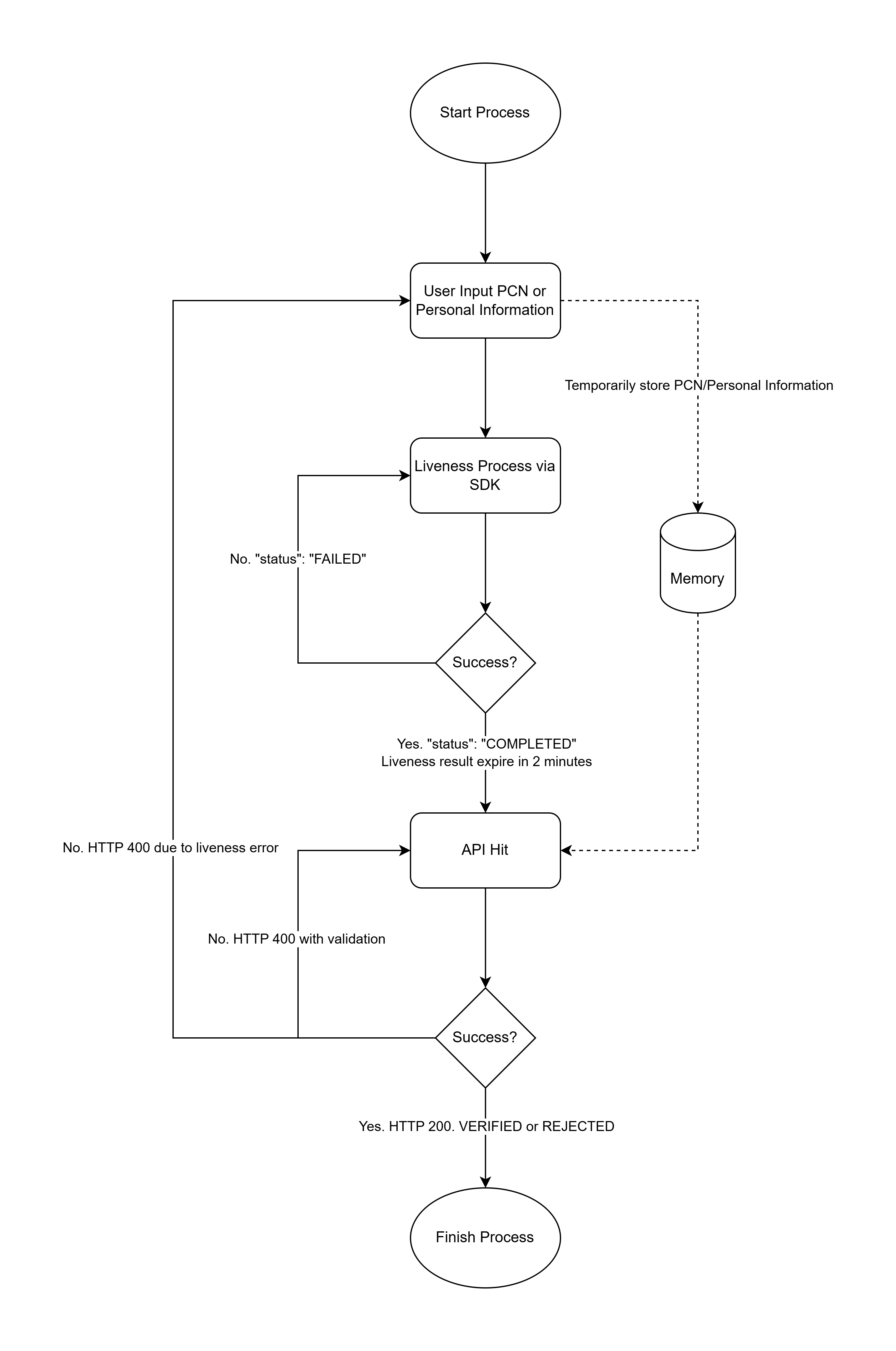
PhilSys Suggested Flow
- User has to fill the PCN or Personal Information form prior of the liveness process.
- The Liveness Mobile SDK is a mandatory step that performs passive liveness verification. During this process, passive liveness verification and a selfie photo are also captured.
- Once the liveness process is completed, a Philsys Session ID will be generated with 2 minutes of expiration time. This Philsys Session ID is required for the subsequent API request.
- The API process can be commenced after the liveness process. This process will require input of PCN or Personal Information (Names, Birth Date and Suffix) and Philsys Session ID to proceed.
- In this process the inputted PCN or Personal Information will be compared in the government datasource including the selfie photo taken during the liveness process and connected via Philsys Session ID.
- The end result will be a “VERIFIED” or “REJECTED” verdict with complete data returned on verified cases.
Updated about 2 months ago
Did this page help you?